Showing posts with label How To Do. Show all posts

Wednesday, September 21, 2016

How to withdrawal EPF without Employer signature needed

Here is a great news for all EPF account holders. EPFO has come up with new and revised forms using which EPF withdrawal process is now super easy and can happen without employer signature or any involvement. Now you can directly submit the EPF withdrawal forms and the settlement will happen directly into your bank account.
Earlier, the EPF forms were first sent to employer for their verification and signatures, which used to take a lot of time and many a times employers used to harass employees because they had the power to block the EPF withdrawal. However with these new changes, withdrawing from your EPF account is going to be very easy and fast and now it makes a lot sense, because EPF should not be linked to employer anyways. Few months back, with the concept of UAN, the EPFO had anyways delinked the EPFO from the employer to some extent, and this move looks like an extension to that.

New Forms – 19 UAN, l0-C UAN and 31 UAN

EPFO has issued 3 new forms which will be used for as follows
  • Form 19 UAN – You can fill this form to withdraw from your EPF at the time of retirement or leaving the job. Taking our money from the EPF is allowed only if you are unemployed for 2 months. So in case you just change a job and join a new company within 60 days, you can not offically withdraw from EPF, You need to apply for EPF transfer in that case
  • Form 10-C UAN – You can fill up this form in order to withdraw from your EPS amount. EPS account is a seperate account linked to your EPF which is for the purpose of pension. Note that one is allowed to withdraw from EPS only if your EPF is not more than 10 yrs old.Check more details on this here.
  • Form 31 – UAN – This form can be submitted if you want to partially withdraw from Employee providend fund (EPF) account for the purpose like marriage, house buying or medical emergency. There are different rules for different situations. You can check more details on this in this article
Note that there exist forms 19, 10C and 31 already (without the word UAN), but now the new forms end with the word “UAN” to differentiate between old and new forms.

Who can fill up & use these new EPF forms?

Here is the catch!. The new EPF forms can be used by only those employees who fulfil following two conditions
  • UAN must be active and should be linked with aadhaar number
  • Your KYC details (especially bank account number) must be verified by employer using digital signature


If the above two points are true for you, only then you can use these new EPF withdrawal forms.


Step by Step process of withdrawing money from EPF account

Let me help you with the steps of EPF withdrawal now. For the sake of explanation, we will consider the case of Form 19 UAN, which is used to withdraw the EPF money once you leave the job or are retired. The same process is used for the other forms as well.
Step 1 – Make sure your UAN is active and KYC details are verified


These new forms can be used only by those whose UAN is active and all the KYC details are verified by employee as explained above.
Hence, the first step is to verify your eligibility. For that, you can go tohttp://uanmembers.epfoservices.in/ and login with your login and password and then go toProfile->Update KYC Information, where you can either update the details or check them. It looks something like the below example (thanks to my close friend who has passed his details to me for creating this snapshot)


In case, you have more than two UAN allotted to you, then you should discard one of them and should be using the latest one provided to you by the current employer.
Step 2 – Fill up the EPF Withdrawal form and send along with cancelled cheque
Once you have verified that all the details are fine. You can then fill up the form. Below you can see form 19 UAN as an example. One has to provide the Mobile number, UAN number, date of leaving, the reason for leaving the service (make sure you choose it properly, because TDS will be applied depending on that reason),PAN & full postal address.
Note that apart from this form, you also have to attach the cancelled cheque of the bank account which is mentioned in the UAN KYC details.


Step 3 – Send the form to the EPF jurisdiction office
Finally, the last step is to submit this form, along with the cancelled cheque to the EPF office which comes under your jurisdiction. The simple way to find the exact address of the regional EPF Office is to go tohttp://search.epfoservices.org:81/locate_office/office_location.php and enter your state and district of the office where you work/worked. You will get the full address. You can then courier the documents to that address.

The above 3 steps will help you to withdraw from EPF money easily. If you want to withdraw your complete EPF amount, then you need to fill up form 19 UAN and form 10-C and send both of them.

BONUS – Fill up form 31 UAN to withdraw from EPF for purpose of buying house

Let me also share one very important thing related to buying house or repayment of house loan through EPF amount. Form 31 UAN can be filled for partial withdrawal for the purpose like buying house, repaying home loan or things like medical emergency or marriage at home. For more on this, please look at this article.
You can see the snapshot of form 31 UAN below. If you look at 4th and 5th point, you can clearly see that you can take the money directly in the name of the “agency”, which can be the builder or the company which is helping in construction of house. The cheque can be taken for that.


EPF Withdrawal process to be online very soon

I hope you are now clear about these EPF withdrawal forms and how to fill them up. Note that very soon these facilities will become online, it’s just a matter of time. Once that happens, the process will be much smoother and fast, because things will become online.
Let me know if you have any doubts or any questions on this topic. Do you think these forms will help in EPF withdrawal a bit faster?

Monday, September 19, 2016

Download Double Bed Room House Application Form - 2BHK Application Form

Download Double Bed Room House Application Form - 2BHK Application Form :click here


Finally Telangana Government prepared an application form for granting double bed room house. We have told you earlier that just write your application details on a fresh white paper. But now it has gone. Application form came in to exist. Many people do not know where to get this application form. Yes we are providing the 2 bhk application form here you can download from here or else you have another option that go to the any meeseva centre in Telangana and ask for the application form. Recently "meeseva" started issuing the double bedroom house application form.

Request details
Enter food security card number
(Telangana Ration Card Number)

Applicant Details:

  • Name
  • Aadhar Number
  • Gender
  • Age
  • Family members details
  • Communication address
  • Present residential type
  • Pension Holder Aadhar Number
  • Mobile
  • Mail Id etc

Submit your 2BHK application at meeseva for Rs15/-
Telangana Government officials inform us as do not come to collector office in bulk. The Government suggested new two ways to apply for the 2BHK scheme in Telangana. Hyderabad and ragareddy district collector offices are struggling in taking 2BHK application forms. Just think; how they can receive your lakhs of applications?

 Downlaod 2BHK Application
The people are going to the offices to submit their application but do not think that as we submit the application; that means we are going to have the benefit of 2BHK.

Do not crowd.

Two more options from the Telangana Goverment

01. Government Officers visit your ward to receive application. So wait until theit visit.

02. If you do not have patience; No problem go to the nearest meeseva centre. Take application or download application form here and visit meeseava center. You will be charged 15/- and get recept of meeseva for future reference.

It will be surely verified by the government and make a call to your application mobile number or contact through your area officials
Please apply only eligible persons as mentioned in the G.O don,t do for luck basis

Telangana Housing Scheme 2BHK Design-2BHK Plan:

This is the season of the applying for Telangana Housing Scheme for poor. Ofcourse we know that tell us a new thing..Yes We will here to inform you about new news only. Every one is eagerly waiting for aplying for this benefit and thinking about availing of this benefit. But many few are thinking about the 2BHK Design or  2BHK Plan. If you are in that particular list definitely you will come to know of the Telngana Government flagship scheme 2BHK.
The Telangana Government released the proposed plan for double bed room houses. In fact it is really very nice. Just check it once here below.


We can see above,

Bed Room (1): 9'-0'' x 9'-0''----------81 sft
Bed Room (2): 10'-0'' x 9'-0''--------90 sft
Living Room: 12'-10'' x 9'-0''---------140 sft
Kitchen: 6'-0'' x 6-0''-------------------36 sft
Toilet (1): 3'-6'' x 5-0''-----------------18 sft
Toilet (2): 3'-8'' x 6-0''-----------------22 sft
Wash Area: 6'-6'' x 3'-2'' -------------20 sft
Stair Case:  6'-3'' x 13-0''-------------82 sft
Wall Area:-----------------------------71 sft

Total Area: 560 SFT.


Wednesday, September 14, 2016

how to know land details by survey number


Do you want to learn Details of your land, including the survey number ?


The reason for taking bribes to officials of the Department of Revenue in the land disputes, the main reason for the lack of awareness, the people does not know the land laws.
That is why we are appealing to our land, to serve government Web site that is assessing, with the Survey number .

go with this website: http://stgdeptapps.ap.gov.in/Web…/ViewPahani/ViewPahani.aspx

the district , zone , village , and the details of the entry number to serve anyone know

share to every one

Monday, September 12, 2016

BC/ SC/ ST Loan Telangana Application Form:

BC Loan Telangana Application Form:


OBMMS BC Loans: Telangana State Online Beneficiary management and Monitoring System: Here we discuss how to apply for TS BC Loan Telangana Application Form. The Department of Social Welfare scheme launched a separate website [http://tsobmms.cgg.gov.in ] for applying & check the status online.

BC Loan Telangana Application Form click here

how to apply for bc loans, sc loans, st loans in Telangana. please read the complete guidelines of it.
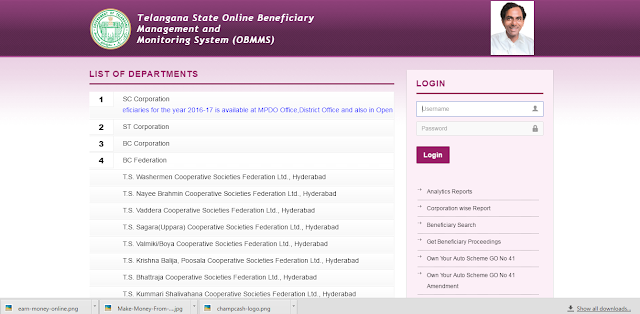
1: OBMMS home page.

2: jest scroll down OBMMS Online apply
BC/SC/ST Loan Telngana Application Form

3. Enter your Aadhar Card Number
4. Fill the Form
Details Needed Before Applying:
Father / Husband Name
Mobile Number
Gender
Physically Handicapped
Urban/Rural Area
Caste
Sub Caste
Qualification
Date of Birth
Age
Current Occupation
Address
Sector Details:
Beneficiary Type
Type of Finance Assistance
Sector
Scheme
Unit Cost
Photo Upload:
Upload Beneficiary Photo
Upload Caste Certificate
Caste Certificate Issued by Mandal
Now you can look preview option
Check all the details once and submit in online.
Final Steps:
·         Now you can get Beneficiary Id Number in online and Take print out of that entire application form of BC/SC/ST/Kapu Corporation loans.
·         Now submit your Printed BC Corporation loans application form at MPDO office and you should take an MPDO / Municipal Commissioner Signature in that application form.
Help Desk:
For any online issues please contact : helpdesk.obms@cgg.gov.in
(Mention corporation name & State Name)
LIST OF DEPARTMENTS
1.SC Corporation
2.ST Corporation
3.BC Corporation
4.BC Federation
T.S. Washermen Cooperative Societies Federation Ltd., Hyderabad
T.S. Nayee Brahmin Cooperative Societies Federation Ltd., Hyderabad
T.S. Vaddera Cooperative Societies Federation Ltd., Hyderabad
T.S. Sagara(Uppara) Cooperative Societies Federation Ltd., Hyderabad
T.S. Valmiki/Boya Cooperative Societies Federation Ltd., Hyderabad
T.S. Krishna Balija, Poosala Cooperative Societies Federation Ltd., Hyderabad
T.S. Bhattraja Cooperative Societies Federation Ltd., Hyderabad
T.S. Kummari Shalivahana Cooperative Societies Federation Ltd., Hyderabad
T.S. Viswabrahmins Cooperative Corporation Ltd., Hyderabad
T.S. Medara Finance Corporation Ltd., Hyderabad
T.S. Toddy Tappers Cooperative Finance Corporation Ltd., Hyderabad
5.TS Minorities Finance Corpn
6.TS Christian Minorities Finance Corpn
7.Disabled Welfare
8.Telangana Women Cooperative Finance Corporation.

The complete process how to apply for SC, ST, BC Loan Telangana Application Form details provided above.